Introduction
Agent tools are shifting from passive responses to proactive collaboration, yet most users remain at the basic question-and-answer stage. The emergence of Skill has completely changed this situation—it encapsulates team experience, workflows, and industry knowledge into reusable digital assets, much like a standardized recipe. This article deeply analyzes the underlying logic and practical methods of Skill, revealing the true competitive barriers in the AI era.

When we talk about agents, many might think of just installing Claude Code or OpenClaw. But then what? It often leads to repeatedly explaining needs from scratch, similar to explaining your food preferences to a new waiter each time you visit a restaurant.
During my AI corporate training this year, I noticed an awkward phenomenon: product managers in the team were using AI, but after demonstrations, they still struggled to apply it later. The issue lies in their approach—they were merely “asking” AI instead of “teaching” it.
Skill is here to solve this problem.
What is Skill? — The Employee Handbook for AI
Before we delve into what Skill is, let’s first understand a pain point. Have you ever had to explain your role, the tools your team uses, and the report formats every time you interact with AI? It feels like training a new employee from scratch, only to forget everything by the next interaction.
The essence of this problem is that while large models have vast knowledge reserves, they lack understanding of your specific workflows. They know how to write code but are unaware of your team’s coding standards; they can handle data but don’t know your analytical methodologies.
How do we understand Skill? I’ll use three metaphors:
-
Prompt is the Order. You tell the waiter, “Boss, give me a beef burger, no onions”—the instruction is clear, but how it’s made depends on the chef’s mood. A prompt gives AI a directive, but the execution is left to its discretion.
-
MCP is the Kitchen Tools and Ingredients. Spatulas, frying pans, beef patties, and buns are essential for executing tasks. MCP addresses what tools AI can utilize.
-
Skill is the Secret Recipe plus Employee Manual. “Step one, the patty must be fried for three and a half minutes; step two, the sauce should be squeezed in two and a half circles; step three, clean the stove after cooking.” Skill defines the sequence of actions, quality standards, and execution criteria. With it, AI no longer guesses your intentions but works methodically.
In simple terms: Prompt tells AI “what to do,” MCP tells AI “what tools to use,” and Skill tells AI “how to do it.”
Thus, an agent without Skill is like a new employee—you need to train and repeatedly teach them. An agent with Skill, however, is like a seasoned colleague—ready to use, cooperative, and reliable.
Knowledge Card: Skill is the AI era’s “Employee Handbook”:
- Prompt = Order (tells what to do)
- MCP = Kitchen Tools (tells what to use)
- Skill = Secret Recipe + Employee Manual (tells how to do it)
Core Structure of Skill — The Four-File Folder
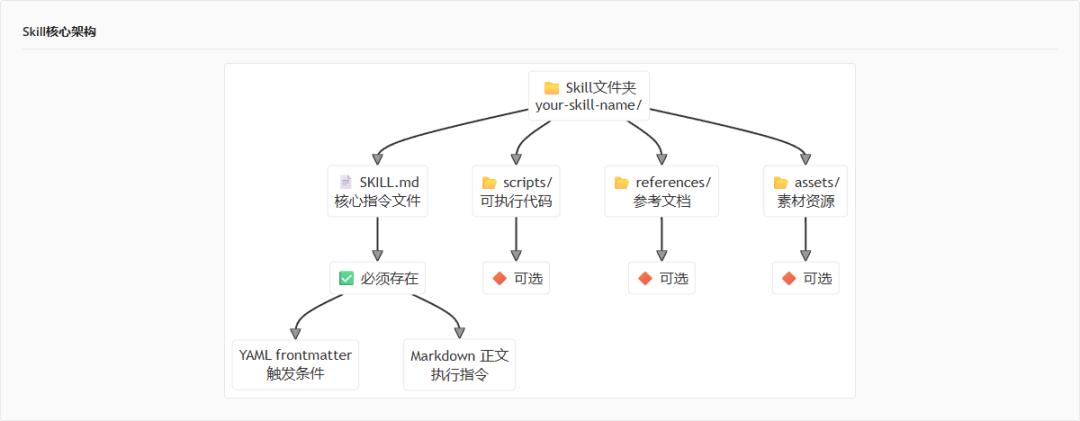
Now that we understand what Skill is, let’s look at what it looks like. Skill is essentially a standardized folder. Yes, you heard that right—a folder. It contains some Markdown files, scripts, reference materials, and that’s it.
The standard Skill structure is as follows:
your-skill-name/

├── SKILL.md  # Required — core instruction file

├── scripts/   # Optional — executable code

├── references/ # Optional — reference documents

└── assets/    # Optional — resource materials
SKILL.md is the core file and is mandatory. It contains two parts: YAML front matter (for AI to determine “when to use this Skill”) and the Markdown body (specific execution instructions).
scripts/ is optional, used to store executable code, such as Python scripts or Bash scripts. When Skill needs to perform automated tasks, scripts are placed here.
references/ is also optional, used for lengthy reference documents, like technical specifications, API documentation, code snippets, design guidelines, etc. This content is not loaded by default; AI reads it only when needed.
assets/ is similarly optional, used for templates, fonts, images, and other resource materials.
Regarding naming, here are some rules to follow:
- Folder names must use kebab-case (hyphen-separated lowercase letters), e.g.,
article-scorer,pdf-parser. Avoid spaces, underscores, or uppercase letters. - Folder names cannot end with
-skill. For instance, you cannot create a folder namedarticle-scorer-skill. - The packaged file name format is
.skill, e.g.,article-scorer.skill. - All documents should be placed in SKILL.md or references/; do not place them in README.md.
Thus, the core structure is as follows:
Hands-On Practice: Creating an “Article Scorer” Skill
Now, let’s create a real Skill step by step. This Skill’s function is to help users evaluate the quality of an article, providing scores and improvement suggestions.
Step 1: Create the Folder Structure
First, create a folder named article-scorer:
article-scorer/

├── SKILL.md  # Required

├── scripts/   # Optional, not created this time

├── references/ # Optional, not created this time

└── assets/    # Optional, not created this time
Step 2: Write the YAML Front Matter
Open SKILL.md and first write the YAML front matter. This part determines when this Skill will be triggered:
---

name: article-scorer

description: Evaluates article quality and provides improvement suggestions. Use when users say "help me score this article," "evaluate how well this article is written," or "give this article a score."

---
The name field must be in kebab-case, without uppercase letters or underscores. The description field is crucial as it tells AI when to use this Skill. A good description should include two parts: what it can do and the triggering scenarios.
Step 3: Write the SKILL.md Body
After writing the YAML, start writing the body. The body structure generally includes the following sections:
Task Objectives:
## Task Objectives

- Evaluate the overall quality of the article, including structure, logic, and expression across three dimensions.
- Provide a comprehensive score from 1 to 10.
- Identify the main issues of the article and offer specific improvement suggestions.
Scoring Criteria:
## Scoring Criteria

- Structure (30%): Is the introduction engaging? Is the hierarchy clear? Does the conclusion summarize well?
- Logic (40%): Are the arguments clear? Is the evidence sufficient? Is the reasoning rigorous?
- Expression (30%): Are the sentences smooth? Is the word choice accurate? Are there any typos?
Operation Steps:
## Operation Steps

1. Read the article content provided by the user.
2. Analyze according to the scoring criteria.
3. Calculate the overall score.
4. Output the score results and improvement suggestions.
Output Format:
## Output Format

The final output should include:

- Comprehensive score (1-10)
- Scores for each dimension (structure/logic/expression)
- Main advantages (1-3 points)
- Main issues (1-3 points)
- Improvement suggestions (specific and actionable)
This simple Skill is now complete. You see, it’s not that complicated; it’s just a standardized folder with Markdown files.
YAML Front Matter Explained — The Key to Triggering Skill
The YAML we just wrote seems simple, but there are many nuances. The description is the most important field in the front matter because it determines when AI activates this Skill.
Some might say, “Isn’t the description just a few sentences? What’s so hard about it?” But honestly, I’ve seen too many people write descriptions that are as cryptic as riddles, leaving AI clueless about when to activate this Skill.
Let me show you two contrasting examples.
Negative Example:
description: A useful tool
Positive Example:
description: Evaluates article quality and provides improvement suggestions. Use when users say "help me score this article," "evaluate how well this article is written," or "give this article a score."
What’s the difference? A good description contains specific trigger phrases, allowing AI to match user intent accurately.
A good description should include three elements:
- What it can do. Clearly state the core functionality of the Skill, e.g., “evaluates article quality and provides improvement suggestions.”
- When to use. Tell users how to trigger this Skill, e.g., “use when users say ‘help me score this article.’”
- Trigger phrases. List typical user expressions to help AI recognize them accurately.
However, there are two common mistakes to be aware of:
- Description is too lengthy. The front matter loads with every conversation, so if it’s too long, it wastes valuable context space. Generally, keep the description between 100-150 characters.
- Stuffing multiple functions into one Skill. Some think it’s cumbersome to create a Skill for a single task, so they want a “universal Skill.” This is poor design. The core principle of Skill is that each Skill should do one thing only.
Knowledge Card: Three Elements of Description:
- What it can do — Core functionality
- When to use — Trigger timing
- Trigger phrases — Typical expressions
Principle: Keep it within 100-150 characters, and each Skill should do one thing only.
Writing the SKILL.md Body — The Art of Progressive Disclosure
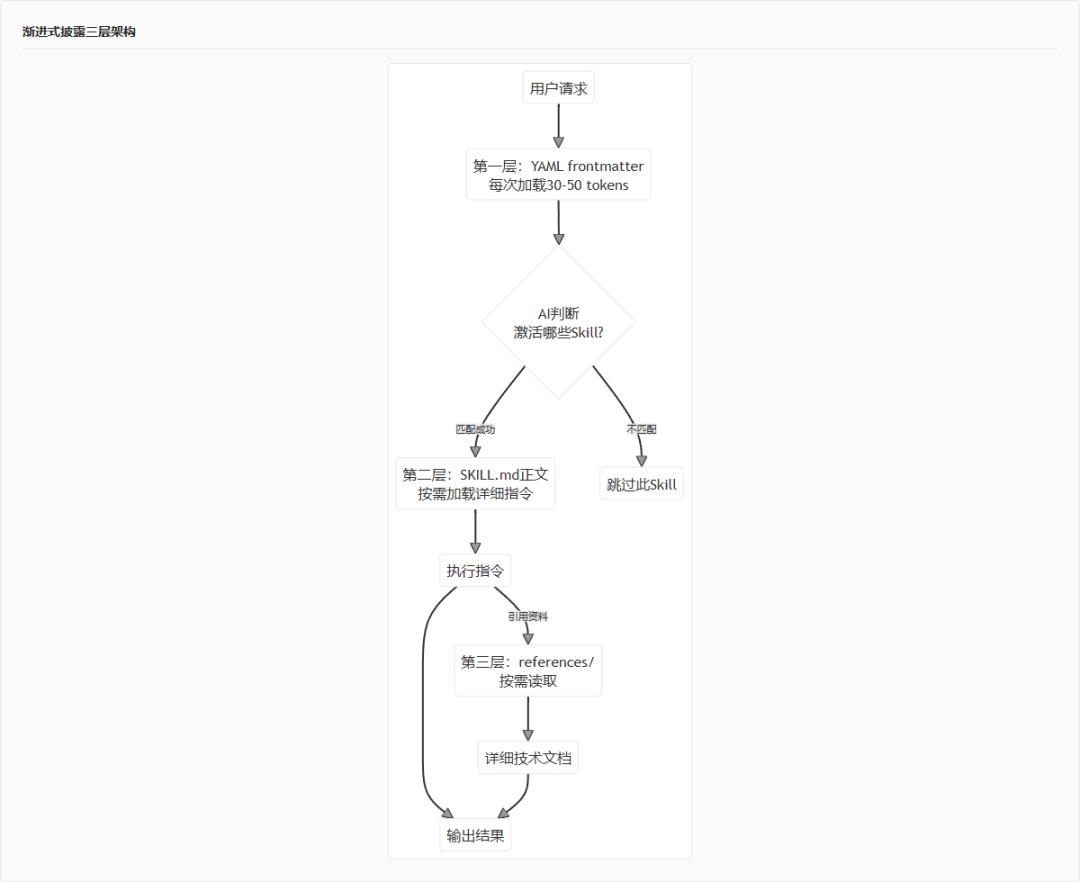
Having discussed the front matter, let’s look at how to write the body. The most important design philosophy of Skill is “progressive disclosure.” What does this mean?
AI struggles with long contexts; if every activation of Skill loads all content, efficiency drops. Progressive disclosure addresses this issue.
It consists of three layers:
- YAML front matter. At the start of each conversation, AI loads the names and descriptions of all available Skills. This content must be concise, around 30-50 tokens. AI uses this information to determine which Skills to activate.
- SKILL.md body. Only when AI decides to use a Skill does it load the complete body content. The body can contain thousands of words of detailed instructions, but only occupies context when needed.
- References/ folder links. If the body references materials, AI reads these files as needed rather than loading everything at once.
This design’s brilliance lies in “lazy loading.” Just like web images load only when scrolled into view, it saves tokens and helps AI maintain focus during long conversations.
Next, let’s examine the structure of the body. Anthropic recommends the following standard structure:
- Task Objectives: Describe what this Skill is for and suitable scenarios.
- Prerequisites: What dependencies are needed, what files to prepare.
- Operation Steps: Specific execution processes, ideally providing a decision tree to guide AI on which branch to take under what circumstances.
- Resource Index: Inform AI where to find scripts, reference materials, templates, etc.
- Notes: This section is crucial! Based on Anthropic’s internal team experience, the most valuable content is the “common traps” chapter—documenting Agent failure modes so that successors can avoid pitfalls directly.
A high-quality SKILL.md typically includes the following elements:
- Clear boundaries of responsibility. Tell AI what it can and absolutely cannot do. For example, a SQL analysis Skill should clearly limit itself to executing SELECT queries, prohibiting DROP, DELETE, and other dangerous operations.
- Specific executable steps. Instead of writing “analyze this article,” write “step one, read the article; step two, check the structure; step three, evaluate the logic.”
- Error handling mechanisms. What should AI do if a step fails? There should be a clear fallback strategy.
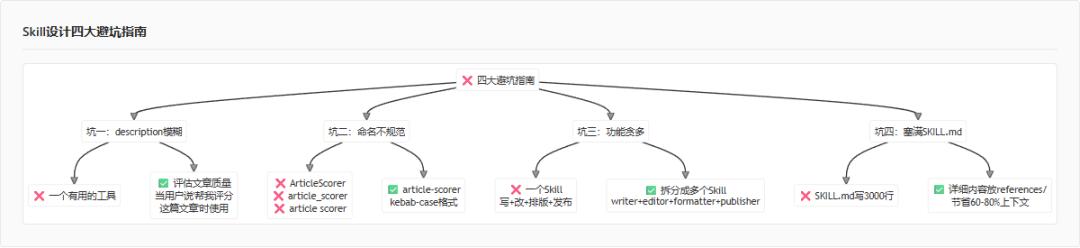
Pitfall Guide — Common Errors Summarized by Anthropic
Finally, I’ll summarize some common pitfalls based on Anthropic’s official guidelines and my practical experience.
Pitfall 1: Vague description, making it hard for AI to determine when to trigger
description: Generate unit tests. Use when users say "write a test," "help me test this code," or "generate unit test."
Pitfall 2: Non-compliant folder naming
Incorrect: ArticleScorer, article_scorer, article scorer
Correct: article-scorer
Remember, kebab-case is the only standard format.
Pitfall 3: One Skill doing too many things
Negative Example: A Skill that can write articles, edit articles, format them, and publish them.
Positive Example: Split into four independent Skills—article-writer, article-editor, article-formatter, article-publisher.
Why? Because multiple Skills can load simultaneously; if one Skill is too large and comprehensive, it loses flexibility. Skills that focus on one task are easier to combine for use.
Pitfall 4: Stuffing all content into SKILL.md
Negative Example: SKILL.md contains over 3000 lines filled with various reference materials.
Positive Example: SKILL.md only writes the core process, with detailed technical documents placed in references/, allowing AI to read them as needed.
What’s the benefit of this approach? AI only needs to load the content it truly requires each time, reducing context consumption by 60%-80%.
Knowledge Card: Four Major Pitfall Guidelines:
- Description must be specific, including trigger phrases.
- Folder names must use kebab-case.
- One Skill should only do one thing.
- Detailed content should be placed in references/.
With that, we’ve covered how to start writing Skills from scratch.
Have you ever felt this way? In the AI era, everyone discusses how to “use” AI and how to “ask” AI. However, the real differentiator is those who can “teach” AI.
How to teach? You need to encapsulate your experience, team workflows, and the implicit knowledge that only seasoned employees know into one Skill after another.
This isn’t about writing code; it’s about building digital knowledge assets.
A well-written Skill can be used by everyone in the team. New colleagues no longer need to start training AI from scratch. The best practices summarized by veterans won’t disappear when they leave.
Thus, I assert that Skill is the most important asset in the AI era.
In this age, what we should learn is not just to “ask AI” but to “teach AI.” Delegate repetitive tasks to AI and focus your energy on what truly matters. In short, concentrating on your business is the key in the AI era.
Comments
Discussion is powered by Giscus (GitHub Discussions). Add
repo,repoID,category, andcategoryIDunder[params.comments.giscus]inhugo.tomlusing the values from the Giscus setup tool.